 Home
 Back
 Forward
 Print
How to Use Help
Enabling the Menu
To enable the Help Menu click on Help in the top tool bar of Real Estate Manager. Click on On Line Help. Alternatively press <F1> for a short cut to intialise the Help screen, displaying Contents and Search tabs.
The Help Menu is a comprehensive guide to the utilisation of the Real Estate Manager system. You may print out the various help topics if you wish to create your own manual, however it is advised to bear in mind that the Help Menu is updated with every upgrade released thereby ensuring its validity. Consult the help screen if you would like further information on a topic, see what areas are available in the Real Estate Manager system that you are not using or using effectively, or look up the Troubleshooting menu for advice on common problems.
Whilst the Help Menu is beneficial to many, in some instances you may require the help of our Support Team to assist you with more detailed queries, if so please log a support call on our website: www.multiarray.com/support
The Toolbar

Back and Forward
If you have opened more than one Help screen during a session, these buttons allow you move between these screens.
Home
Click this to return to the opening Help screen.
If you have accessed a Help screen from the Contents tab, clicking Print gives you two options - to print the current heading or to print the entire Help topic.
If you have accessed a Help Screen from the Index or Search tabs, clicking Print will print the information for the current heading only.
Tabs
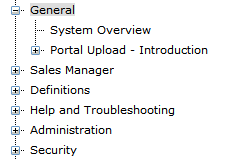
Contents
Clicking on the main topic (e.g. Security) will give you a title page containing a list of topics. Use the links to click on each sub topic to be directed to that area. Alternatively, clicking on the cross to the left of the topic heading will also give you a list of topics to choose from.
Search
Type an appropriate search word (e.g. Debit) and either press <Enter> or click on Go. A list of Help Topics containing that search word will be presented. Select the one you want and click on Display. If you want to search for an exact expression (e.g. Advertising Plan), enclose the expression in quotation marks - i.e. "Advertising Plan".